THOUGHT CENTER > Blog > CCTV

What Is an IP Camera and How Do They Work?

March 9, 2022

IP cameras have taken center stage in modern surveillance systems. Older setups relied on analog processes using coaxial cabling, which limited video clarity. In contrast, IP cameras operate over digital networks and process video as pixel-based data; there's no conversion needed in the DVR or NVR. The result is sharper footage, remote accessibility, and seamless integration with other technologies which delivers a more comprehensive and dependable security solution.

Mammoth Takeaways

  • IP cameras are built for today’s digital demands.
    They deliver superior resolution, network integration, and flexibility compared to outdated analog systems.
  • PoE simplifies installation and cuts infrastructure costs.
    Power and data flow through a single cable, making deployments faster and more efficient.
  • Remote access and smart features enhance control.
    From mobile viewing to motion alerts and analytics, IP cameras offer tools that improve both security and operations.
  • Expert system design ensures long-term success.
    Mammoth Security customizes every installation for maximum coverage, performance, and ROI.

IP Camera Definition and Core Technology

What Does IP Camera Mean?

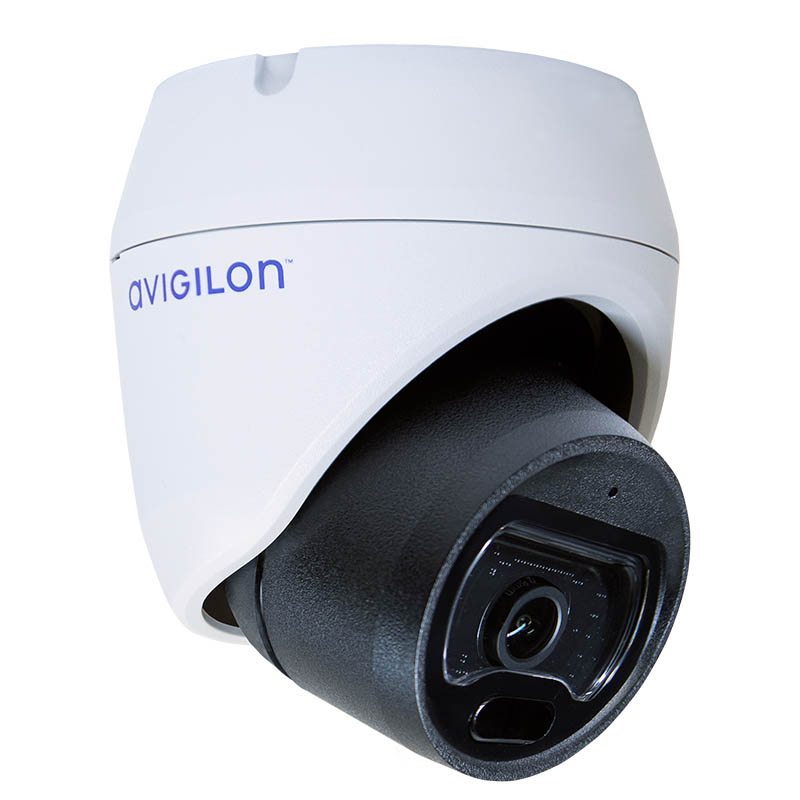
An IP camera, or Internet Protocol camera, is a digital surveillance device that transmits video data over a network rather than through analog cabling. This method of transmission allows for faster speeds and higher quality output. IP cameras can also be powered AND transmit data on PoE cords (power over Ethernet).

Unlike older CCTV systems that use coaxial cables and analog signals, IP cameras:

  • Capture video digitally at the source (no later conversion needed)
  • Compress and encode the footage
  • Transmit the data over an IP network (like Ethernet or Wi-Fi)

Each IP camera has its own unique IP address, allowing it to communicate directly with storage devices, video management systems, or cloud platforms without needing a central DVR. These addresses provide individual access to cameras on a network for ease of management.

Key distinctions from traditional surveillance:

  • Signal Type: IP cameras use digital signals, offering higher image quality and efficiency. Analog systems require separate cables for video and power and produce less-than-ideal final imagery.
  • Remote Access: With IP technology, users can access footage from anywhere via Internet-connected devices.
  • Scalability: Adding or relocating cameras is easier with network-based systems since there is little to no wiring involved, depending on the setup.
  • Integration: IP cameras integrate with access control and alarm systems for centralized security management.

IP cameras improve security monitoring by combining video capture, processing, and networking into a single, intelligent device.

Key Components of IP Security Cameras

Because of their self-contained nature, IP cameras are made from an impressive collection of different technologies in order to capture and process footage. Each internal piece has its own function towards the final goal.

Image Sensor and Lens

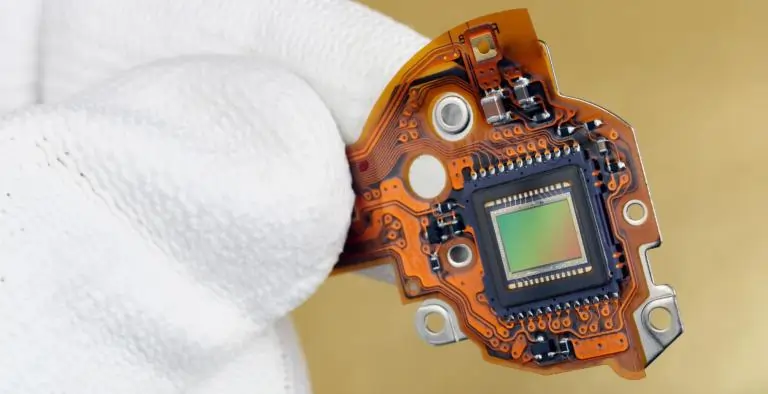
As with any lens, the purpose is to focus incoming light, specifically onto a CMOS sensor which converts the light into electric signals. The sensor then determines the image resolution, field of view, and ability to work in low-light conditions.

Built-in Processor and Compression

IP cameras use built-in processors to compress video into efficient formats like H.264 and H.265. This reduces file sizes while maintaining image quality, making real-time monitoring and long-term storage more efficient.

Network Interface

The benefit of Internet Protocol cameras is their ability to communicate via network connection. They are able to transmit data over Ethernet or Wi-Fi. Each camera has its own identifying IP address which enables the ability to send video to NVRs and video management systems. There’s no reliance on a DVR.

Power Options (PoE vs. Traditional)

PoE stands for Power over Ethernet, a technology that delivers both power and data to a camera through a single cable. Traditional systems rely on separate wiring for power and connectivity, which adds complexity to system design and installation.

How Do IP Cameras Work?

Step-by-Step Process

Once installed and connected to a network, an IP camera functions as an independent surveillance device. It continuously processes video on-board and sends it directly to the designated storage or monitoring system—whether that’s an NVR, cloud platform, or live viewing interface.

Each camera communicates with the network through its assigned IP address, allowing it to be monitored, managed, and updated remotely. Users can access footage in real time or on-demand using desktop software, mobile apps, or web browsers, depending on system configuration.

Power is supplied either through traditional means or more commonly via PoE (Power over Ethernet), which streamlines installation by eliminating the need for separate power lines.

This setup allows IP cameras to deliver real-time visibility and control without requiring manual oversight or physical access to the recording location.

IP Camera vs CCTV: Key Differences

While both IP cameras and CCTV systems serve the same fundamental purpose of video surveillance, the technologies behind them differ significantly in performance, flexibility, and long-term value.

Technology: Digital vs. Analog

CCTV systems transmit analog signals over coaxial cables and require a DVR to digitize the footage. IP cameras capture and transmit digital video directly, allowing for smarter integration and eliminating the need for signal conversion.

Image Quality

IP cameras support higher resolutions, often exceeding 1080p and reaching up to 4K or more. Analog systems typically offer lower resolution, which can make it harder to capture critical details such as faces or license plates.

Installation Complexity and Cost

CCTV installations often involve separate wiring for power and video, increasing labor and material costs. IP systems are more streamlined, especially with Power over Ethernet (PoE), which uses a single cable for both power and data. This reduces infrastructure requirements and simplifies deployment.

Scalability and Future-Proofing

Expanding a CCTV system can be labor-intensive, requiring new cabling and potential DVR upgrades. IP systems are designed for scalability, allowing new cameras to be added with minimal disruption. Most platforms support plug-and-play setup through the network.

Remote Access and Monitoring

Remote access on CCTV systems is limited and may require additional hardware or complex configuration. IP cameras are built for connectivity, offering live viewing and playback through web browsers, mobile apps, or centralized software from virtually any location.

Overall, IP camera systems deliver higher-quality footage, easier expansion, and broader access options, making them a better fit for modern security needs.

Current IP Camera Market (2024–2025)

Market Growth and Statistics

The global IP camera market continues to expand as more organizations and consumers move toward networked surveillance solutions. Valued at approximately $15.2 billion in 2024, the market is projected to grow to around $17.7 billion in 2025, with analysts expecting steady double-digit growth throughout the rest of the decade.

This momentum is driven by increasing demand for high-resolution video, AI-powered analytics, and stronger network connectivity, along with broader adoption of digital infrastructure across the video surveillance industry.

Adoption trends show just how flexible IP camera technology has become across different industries. Businesses, transportation hubs, municipalities, and schools are increasingly using networked cameras to support security needs and day-to-day operations, especially within public safety and enterprise settings across North America. At the same time, residential use continues to grow as smart home systems and connected devices become more common.

Historical Background and Evolution

The first IP camera was introduced in 1996 by Axis Communications, marking a turning point in surveillance technology. Known as the Axis Neteye 200, it allowed users to view live video over the Internet without requiring a direct connection to a recording device. This development laid the foundation for network-based video surveillance, moving the industry beyond the limitations of analog systems.

Before this shift, security monitoring depended largely on analog CCTV systems, which originated in the 1940s and became widely used in commercial settings during the 1970s and 1980s. These systems transmitted video over coaxial cables to local monitors or DVRs, offering limited resolution and little to no remote access. The move toward digital surveillance in the early 2000s was fueled by advances in image sensors, networking capabilities, and data storage technologies.

Key innovations that followed include Power over Ethernet (PoE), which streamlined installation by delivering power and data through a single cable, along with smart analytics such as motion detection, object tracking, and facial recognition. High-definition video, cloud-based storage, and mobile access have further advanced IP camera systems, making them scalable, intelligent solutions for commercial, public, and residential surveillance.

Types of IP Security Cameras

Modern IP security cameras are built for a wide range of environments and surveillance needs. They can be categorized based on how they connect to networks and how they are physically deployed. Understanding these distinctions helps businesses and property managers choose the right configuration for performance, coverage, and budget.

By Network Connectivity

Wired IP Cameras

These cameras connect directly via Ethernet cables and often use Power over Ethernet (PoE), which transmits both data and power through a single cable. Wired setups are ideal for long-term installations that require stable connections and consistent performance.

Wireless IP Cameras

Wireless models connect via Wi-Fi, making them easier to install in locations where running cables would be difficult or costly. While they offer more flexibility in placement, they depend on network strength and may require separate power sources unless battery-operated.

Hybrid Connectivity

Some IP cameras support both wired and wireless connections, allowing users to adapt the setup based on their infrastructure. These are useful in transitional environments or facilities upgrading legacy systems.

By Installation Type

Indoor IP Cameras

Designed for controlled environments, indoor models typically have a compact form factor and are optimized for low-light or interior lighting conditions. They’re common in offices, retail spaces, schools, and residential interiors.

Outdoor IP Cameras

Outdoor units are weatherproof and often rated for impact resistance and wide temperature ranges. These are built to withstand rain, dust, and tampering, making them ideal for parking lots, perimeter fencing, and facility entrances.

PTZ (Pan-Tilt-Zoom) Cameras

PTZ cameras offer remote directional and zoom control, allowing operators to actively monitor wide areas or zoom in on specific incidents. These are common in larger installations like campuses or industrial sites.

Fixed vs. Varifocal Lens

  • Fixed-lens cameras have a set field of view and are typically used in areas with consistent monitoring needs.
  • Varifocal-lens models allow manual or motorized adjustment of zoom and focus, providing more control over coverage during installation or use.

IP Camera Types and Applications

Camera Type Ideal Location Key Features
Wired IP (PoE) Offices, commercial sites Reliable connection, combined power/data cable
Wireless IP Homes, remote areas Flexible placement, Wi-Fi connectivity
Indoor Camera Retail, hallways Compact design, indoor light optimization
Outdoor Camera Entrances, perimeters Weatherproof housing, night vision
PTZ Camera Warehouses, parking lots Remote pan, tilt, and zoom control
Fixed Lens Reception desks, corridors Consistent coverage, lower cost
Varifocal Lens Loading docks, open areas Adjustable view, more versatile installation

Real-World IP Camera Applications

Commercial Applications

IP cameras are widely used in business environments to improve security, reduce loss, monitor operations, and support data-driven decisions. Their flexibility and network connectivity make them suitable for everything from small retail shops to large-scale industrial facilities.

Retail Loss Prevention

IP cameras deter theft and enable real-time monitoring at entrances, checkout areas, and high-risk zones. Video analytics help identify suspicious behavior and reduce shrinkage.

Office Security and Access Control

Surveillance systems integrated with access control can verify badge entries, detect unauthorized access, and provide an audit trail for sensitive areas like server rooms or executive offices.

Warehouse and Inventory Oversight

Strategically placed cameras improve visibility in loading bays, aisles, and storage zones. This supports inventory accuracy, reduces misplacement, and improves workplace safety compliance.

Customer Behavior and Operational Analytics

In retail and hospitality settings, IP cameras equipped with AI can track customer movement, dwell time, and queue lengths—offering insights to refine layout, staffing, and service.

Residential Applications in Multi-Tenant Properties

In apartment buildings and multi-family residences, IP camera systems offer property managers the tools to improve security, manage risk, and enhance resident confidence.

Common Area Surveillance

Cameras monitor entrances, lobbies, mailrooms, garages, and elevators—helping deter theft, vandalism, and unauthorized access.

Remote Monitoring and Alerts

Property staff can receive alerts for motion or access events and review footage remotely, improving incident response without needing to be on-site.

Amenity Protection and Liability Reduction

Pools, gyms, and community rooms benefit from visible monitoring that can discourage misuse and help resolve disputes or claims.

Benefits of IP Cameras for Business Security

IP cameras offer benefits for businesses that go beyond simple watchful eyes and recording. Their various features can give security advantages that keep employees, assets and property safe. Some advanced versions can also provide insight on patterns where processes could be improved.

Crime Deterrence and Loss Reduction

Easily visible IP cameras can work as an effective deterrent against crime. Statistics show that 83% of burglars avoid locations with cameras, while CCTV areas show 33% fewer thefts, per CUNY. Even just the presence of a security camera tends to make would-be thieves reconsider.

Faster Incident Investigation and Resolution

Since IP cameras are able to capture higher quality footage than analog, and transmit that data faster, it allows for quicker resolution to incidents.

Enhanced Remote Monitoring and Accessibility

Modern IP camera systems are built with remote access functionality that supports secure viewing of footage from mobile devices and computers. Over 80% of users consider this feature a core benefit, enabling consistent oversight and helping teams stay informed across multiple properties.

Insurance Savings and Financial ROI

Many commercial insurers provide premium discounts ranging from 5% to 20% for businesses equipped with professionally installed surveillance systems. These ongoing savings, combined with the reduction of theft-related losses and operational inefficiencies, contribute to a compelling return on investment. For many organizations, security infrastructure pays for itself over time through both cost avoidance and improved operational outcomes.

Scalability and Efficiency

IP camera systems outperform analog alternatives in both network efficiency and expansion capability. Today’s IP infrastructure supports extensive camera fleets with minimal bandwidth strain, and additional devices can often be integrated with limited modifications. This makes IP-based surveillance a practical choice for businesses anticipating growth, multi-site operations, or phased buildouts.

Integration with Business Operations

Modern IP surveillance systems contribute far beyond physical security. When paired with video analytics, high-definition footage can reveal patterns in employee movement, customer engagement, and traffic flow. These insights help organizations make data-driven decisions about staffing, store layout, and customer service strategies—turning security systems into tools for business optimization.

24/7 Continuous Surveillance

IP camera systems provide uninterrupted monitoring with features like motion detection, zone alerts, and low-light visibility. This continuous coverage ensures that potential threats or irregularities are recorded in real time, regardless of staffing levels. The result is greater situational awareness and reduced vulnerability across all hours of operation.

IP Camera Buying Guide

Choosing the right IP camera system requires more than picking a model off the shelf. Businesses and property managers must align security goals with performance features, installation logistics, and long-term operational needs. This guide outlines the key factors to evaluate before investing.

Determining Your Requirements

Start by assessing your site-specific needs to avoid under- or over-investing.

  • Coverage Area Assessment

    Determine the physical spaces each camera needs to cover. Wide-angle lenses work well for open spaces, while tighter focal lengths are better for entryways and corridors.

  • Resolution Needs

    Standard 1080p resolution is suitable for general monitoring, while 4K cameras provide greater detail for facial recognition, license plates, or expansive coverage areas.

  • Indoor vs. Outdoor Requirements

    Cameras placed outdoors must be weather-resistant and often require higher durability ratings (IP65 or higher). Consider low-light environments and the potential need for infrared night vision.

  • Budget Planning and Cost Factors

    Factor in not just camera hardware, but also network cabling (if wired), storage, software licensing, and ongoing maintenance. PoE setups can reduce cabling costs, while cloud storage may carry recurring fees.

Technical Specifications Checklist

Evaluating camera specs ensures your system performs reliably under your specific conditions.

Resolution and Image Quality

  • Megapixels

    Higher megapixels mean better clarity but also increase bandwidth and storage needs. For most business use cases, 2–5MP is sufficient unless ultra-high detail is required.

  • Low-Light Performance

    Look for features like wide dynamic range (WDR), infrared (IR) LEDs, or low-lux sensors for reliable night or dim-area coverage.

  • Frame Rate

    A higher frame rate (measured in FPS) captures smoother video. 30 FPS is standard for real-time monitoring, while 15–20 FPS may be acceptable for less active zones.

Connectivity Options

  • PoE vs. Wi-Fi
    • PoE offers reliable power and data through one cable—ideal for stable, long-term installations.
    • Wi-Fi provides flexible placement but may be less reliable in high-interference environments.
  • Bandwidth Requirements

    HD and 4K video require more network bandwidth. Estimate how much your current infrastructure can support and whether dedicated switches or VLANs are needed.
  • Storage Options
    • Local storage (NVRs, SD cards) offers control but limits remote access.
    • Cloud storage provides scalability and remote backup but may involve subscription fees and privacy considerations.

Advanced Features

Many modern IP cameras offer built-in intelligence beyond simple video capture.

Motion Detection and Alerts

Cameras can trigger notifications or recording based on movement in defined zones, reducing unnecessary footage.

Two-Way Audio

Ideal for entry points or customer service zones, this allows communication through the camera itself.

Analytics Capabilities

Advanced features like facial recognition, line-crossing detection, or object left behind alerts improve incident response and automation. These often require more processing power or a compatible NVR.

Mobile App Access and Remote Viewing

Ensure the camera system supports secure remote access via mobile apps or browsers, with encrypted transmission and multi-user support.

Installation Considerations

The success of an IP camera system depends not only on product choice but also on how it’s installed and integrated into your network environment. Planning ahead reduces downtime, improves coverage, and ensures long-term reliability.

Professional vs. DIY Installation

While some small-scale systems offer DIY setup with app-based configuration, most commercial environments benefit from professional installation. Certified installers can optimize placement, configure secure network access, and integrate cameras with access control or alarm systems. DIY may be cost-effective upfront, but professional service reduces long-term troubleshooting.

Network Infrastructure Requirements

IP cameras depend on your network’s ability to handle video traffic without lag or data loss. Business environments often require:

  • Dedicated switches (especially PoE switches)
  • Segmented VLANs for camera traffic
  • Sufficient bandwidth for multiple high-resolution streams A site survey can help assess whether existing infrastructure is ready or needs upgrades.

Power Supply Planning (PoE Advantages)

Power over Ethernet simplifies cabling by delivering power and data through a single cable. This not only reduces installation time and labor costs but also allows for more flexible camera placement—especially in areas without nearby outlets. For locations where PoE isn’t feasible, ensure traditional power sources are accessible and weather-protected if outdoors.

Optimal Camera Placement Strategies

Camera position impacts both image quality and coverage effectiveness. Key principles include:

  • Avoiding direct sunlight or glare when placing outdoor units
  • Ensuring entry points and high-traffic areas are clearly visible
  • Mounting at the proper height (typically 8 to 10 feet for commercial spaces)
  • Avoiding obstructions and ensuring clear fields of view

Professional installers can also account for blind spots, lens angles, and lighting conditions to ensure complete coverage without unnecessary overlap.

Mammoth Security’s IP Camera Solutions

IP camera systems offer high-resolution video, remote accessibility, and seamless integration—making them the preferred choice for businesses, apartment properties, and public-sector facilities. To fully realize these advantages, expert system design and installation are critical.

Mammoth Security delivers complete IP camera solutions tailored to each client’s layout, infrastructure, and security priorities. Our team performs detailed site assessments, configures network requirements, and ensures cameras are strategically placed for reliable, long-term performance.

We support a wide range of environments including office campuses, multifamily housing, warehouses, and municipal sites, designing systems that scale and adapt with your needs.

Request a free site survey to consult with a Mammoth Security specialist and build a smarter, more effective surveillance strategy.

NOT COMPLETELY SURE?

860-748-4292

FAQ

The Internet Protocol (IP) defines rules for transmitting digital data over networks, including the Internet.

IP cameras capture video footage and send it over an IP network, like the Internet or a local area network (LAN). In this way, they enable remote access and remote monitoring.

IP cameras offer improved video quality, remote monitoring, advanced analytics, easy scalability, and integration with other security and business management systems.

IP camera systems are categorized as either "on-site," requiring local hardware for storage and management, or "in the cloud," where footage is stored off-site and accessible via the Internet.

Before transmitting over a network, IP cameras compress video data using formats like H.264, H.265, or MPEG-4 to reduce file size and conserve bandwidth.

On-site IP camera systems require local hardware for storage and management, while cloud-based systems store and manage footage off-site via the Internet.

IP cameras provide high-resolution video footage, enabling clear footage to prevent theft, vandalism, and other unwanted activities.

An IP camera is configured to connect to an IP network, such as a local LAN or the Internet. IP cameras are assigned unique IP addresses to enable communication with and recognition by other devices.

Once connected to a network, IP cameras can be accessed remotely from anywhere with Internet access. IP camera systems allow users to view live or recorded footage via web browsers, apps, or dedicated software.

ABOUT THE AUTHOR

The Mammoth Security Team


The Mammoth Security Team brings over a decade of expertise in delivering tailored security solutions, including cameras, access control systems, data wiring, and alarms. With a mission to protect businesses as their own, they combine advanced technology, personalized service, and seamless integration. Recognized on Inc. Magazine's 2024 Regionals list, Mammoth Security provides corporate-level expertise with a local company feel, serving diverse industries with excellence.

Let’s discuss your security strategy and get you a tailored solution that will perfectly fit your security expectations.

Get your FREE copy of ‘Top 10 Questions to Ask Before Purchasing A Camera System’